
macOS gives you one volume slider. Everything that plays audio shares it. If you want Spotify quiet in the background while a call comes through at full volume, macOS has nothing for you — you’re reaching for the app’s own controls one at a time, or you’re installing something that takes over your audio stack.
I spent a week this month deep in the second option, and it’s what finally pushed me to ship the thing I’d been building on the side.
The Wave Link week
I run an Elgato Wave XLR dock. To control it, Elgato wants you to run Wave Link — their audio-routing software. And Wave Link, for me, was a slow-motion disaster.
It installs a virtual audio driver, and the driver is the problem. It crackled every time a device changed. When a device disappeared — AirPods walking out of range, a dock re-enumerating — it couldn’t fall back gracefully; the audio just broke. Worst of all, it can’t handle any change made outside its own app: flip a device in System Settings, or let a device come and go on its own, and Wave Link gets confused instead of adapting. It assumes it’s the only thing touching your audio, and the moment reality disagrees, it falls apart.
Then, when I finally went to remove it, it didn’t remove cleanly. The driver stayed registered, and my browser kept tripping over the phantom devices it left behind — which produced its own multi-day “why won’t Meet see my mic” debugging session, long after I thought Wave Link was gone.
(For the record: I also spent that week chasing a camera-drop problem, and it turned out to be USB bus contention — too many bandwidth-hungry devices sharing one bus, plus a cable quietly negotiating the wrong speed. That one wasn’t Wave Link’s fault; it was physics, and the fix was moving devices onto separate buses. I mention it because the honest lesson of the week was learning to tell “the software is misbehaving” apart from “the hardware is oversubscribed” — and Wave Link was squarely the former.)
None of the audio problems were a hardware problem. My mic worked. My dock worked. The software sitting between them and the OS was the thing failing — and it was failing in ways I couldn’t fix, because I didn’t control it. Somewhere in the middle of removing a HAL plug-in by hand on a managed Mac, I realized the tool I’d been building nights and weekends was the answer to exactly this.
What mixr is
mixr is a per-app volume mixer for macOS. Every app gets its own slider, its own mute, its own live meter. Boost a quiet app past 100%. Rank your microphones so AirPods can’t hijack your input the moment they connect. Auto-duck your music when a call starts and bring it back when it ends.
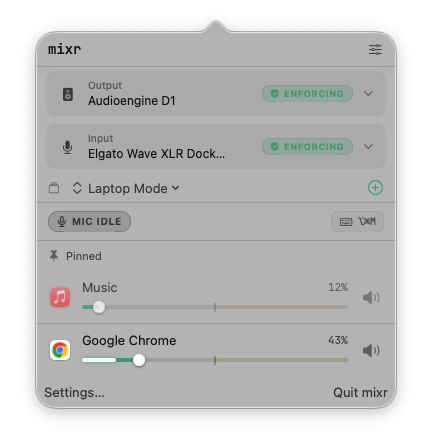
That part is what macOS should have shipped, so that part is free, forever. No trial clock, no feature that stops working, no nag. If all you want is sane audio, you never pay me a cent.
But here’s the part the Wave Link week taught me to care about most:
mixr installs no driver, and it uninstalls clean
This is the line I care about more than any feature. mixr does not install a virtual audio driver. It doesn’t install a kernel extension, a system extension, a login item, or a background agent. It doesn’t ask for admin rights. It touches nothing in your audio path that it doesn’t clean up when it quits.
When you’re done with mixr, you drag it to the Trash and it’s gone. No residue, no orphaned driver, no phantom devices haunting your browser afterward.
It controls your audio through the supported CoreAudio APIs — process taps and control-plane property writes — not by inserting itself as a driver everything has to route through. That’s a deliberate architectural choice, and it’s the whole reason mixr can’t do to your machine what Wave Link did to mine.
It’s honest about what your hardware can and can’t do
Here’s a thing I learned the hard way: audio devices lie. Ask a device “can I set your gain?” and many will say yes, accept the write, echo the value back — and change nothing. The gain doesn’t move. The mute doesn’t mute.
mixr verifies. Every control write is checked by reading back whether the hardware actually responded. If a device claims it can mute but doesn’t, mixr tells you it can’t mute that device — rather than showing you a MUTED indicator over a live microphone. If a device’s gain isn’t really adjustable, mixr says so plainly and points you at where you can set it.
There’s a first-run Setup Advisor that reads your actual hardware and tells you the truth about each device in plain English — including vendor-specific workarounds. It’s not going to pretend it can do something it can’t. I’d rather mixr say “I can’t move this device’s gain, use the interface’s own control” than turn a knob that does nothing.
For my Elgato dock specifically, mixr talks to the hardware directly — gain, mute — with no Elgato software running at all. I get the controls I actually use, and I get to delete the software that kept breaking my camera.
Control it from your Stream Deck
If your audio is your workflow — if you’re on calls all day, or streaming, or juggling half a dozen apps making noise — mixr Pro gives you physical control. Put per-app volume on a Stream Deck dial and turn a knob to duck Spotify. Mic mute on a key. Mic gain on a dial, in dB. Your whole audio setup — devices, levels, mutes — saved as a Profile and switched with one press: “Meetings,” “Recording,” “Focus.”
The dials have live feedback: your levels show on the hardware, mute state shows on the keys. It’s the thing Wave Link’s dial does, except mixr is controlling your real hardware natively, through a supported path, with nothing installed.
And if you’d rather build it yourself, everything mixr can do is scriptable through Apple Shortcuts — free. Set app volume, mute, gain, output, all wireable into your Mac’s own automation. Pro is for the people who want the polished Stream Deck experience built for them instead.
Free vs Pro, and why the line is where it is
Free is everything macOS should have built in: per-app volume, mute, boost, mic ranking, auto-duck, the Setup Advisor, and full Apple Shortcuts control. I won’t charge you to fix gaps in the operating system.
Pro is where mixr molds to your particular setup: Profiles (saved audio states), and Stream Deck control. It’s a $19 one-time purchase — yours forever, twelve months of updates, no subscription.
The reason the split is written down like this is that I know how a crippleware funnel looks, and I didn’t want to build one. Free is genuinely complete for a normal person. Pro is described by who it’s for — people whose audio is their workflow — not by what’s withheld.
It’s live today
mixr is out now, at getmixr.app. It runs on macOS 26+ on Apple Silicon.
Founders discount: use code FOUNDERS for $7 off — $12 instead of $19 — through Sunday, August 9.
I built this because I was tired of audio software that installs a driver, reroutes everything, crackles, can’t cope when anything changes outside its own window, and leaves residue when you try to remove it. mixr installs an app and deletes clean. If you’re hunting for a Wave Link alternative because of weeks like mine, I think you’ll get it.
mixr is made by Machinery Software — a small shop building macOS tools for people who’d rather their Mac just worked. If you try it and something’s off, I’m one email away.